 FluidVoice
A free Wispr Flow alternative that runs on your device
Wispr Flow is a polished dictation app, but its free plan has a weekly word cap and every word is sent to its servers to be transcribed. FluidVoice is free with no word cap, and speech recognition runs on your own Mac, PC or iPhone.

| FluidVoice | Wispr Flow | |
|---|---|---|
| Price | Free for personal dictation | Free plan, or Pro at $15 a month ($144 a year) |
| Free plan limit | No weekly word cap | About 2,000 words a week on desktop |
| Where speech becomes text | On your device | On Wispr Flow’s cloud servers |
| Works offline | Yes, no internet connection needed | No, it needs an internet connection |
| Account | None | Required |
| Source code | Open source | Closed source |
| Devices | Mac; Windows and iPhone in beta; Linux in early beta | Mac, Windows, iPhone and Android |
Is Wispr Flow free?
Partly. Wispr Flow has a free plan, but it is capped at roughly 2,000 words a week on desktop, and less on mobile. Unlimited dictation needs Wispr Flow Pro at $15 a month, or $144 a year.
FluidVoice has no paid tier for personal dictation and no word cap. Because speech recognition runs on your own hardware, there is no per-word server cost to pass on to you.
Fast and private, because it runs locally
There is no upload and no round trip to a server, so your words appear as fast as your own computer can transcribe them. On Mac, a live preview shows them while you are still talking. It works the same on slow Wi-Fi, on a plane or with no connection at all.
The speech models are built to be light. Fluid Speech Mini is a 253 MB download with Parakeet-level English accuracy at a fifth of the size, so it runs comfortably alongside your other apps.
Privacy is built in, not a setting. Your audio never leaves your device, there is no account tied to what you say, and the app is open source, so anyone can check what it does.
Where your voice goes
Wispr Flow sends your audio to its servers, turns it into text there and sends the text back. Its Privacy Mode controls whether that audio and text are kept afterwards, not whether they leave your computer.
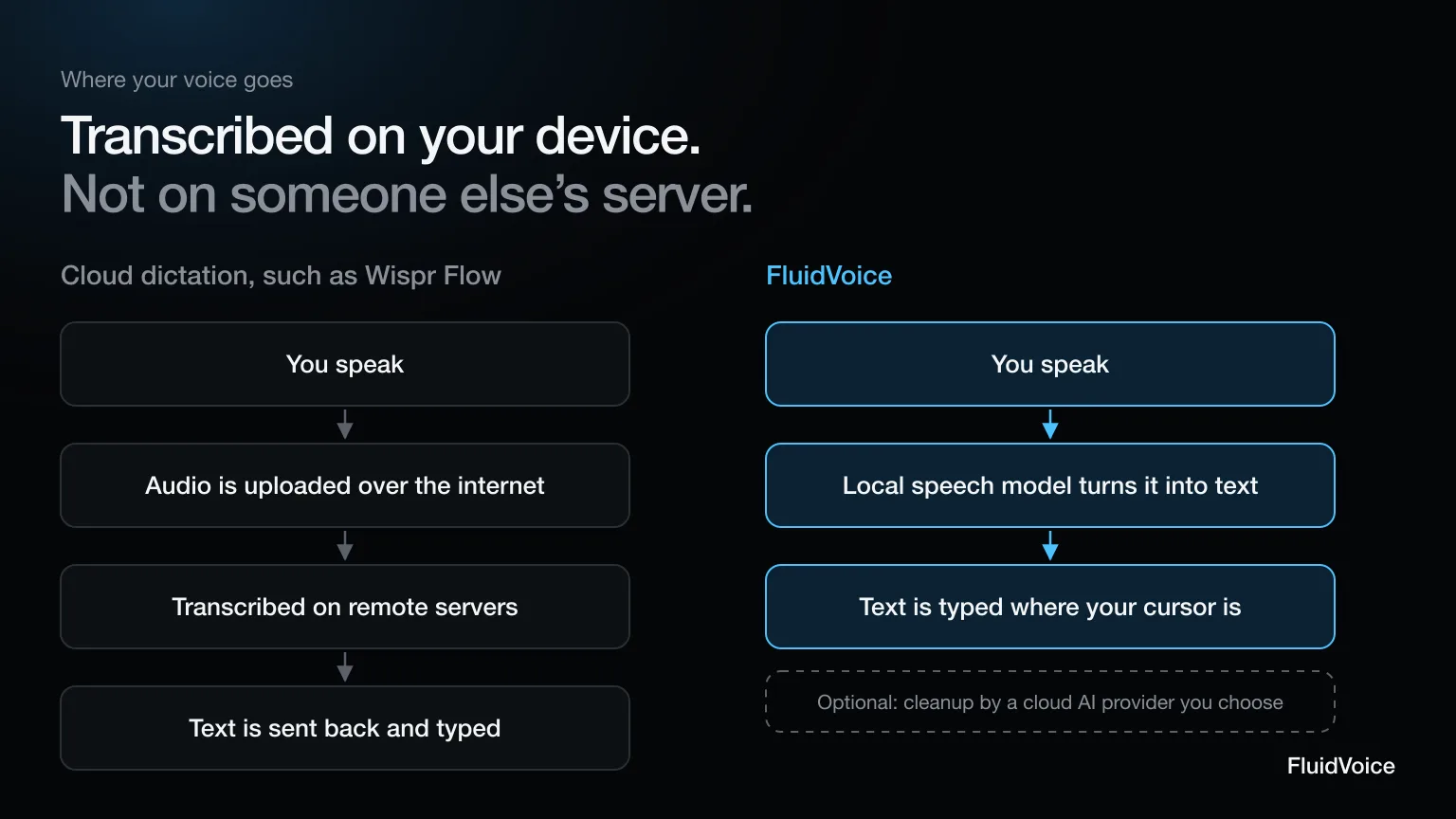
FluidVoice downloads a speech model once and then runs it locally. Your audio and the text you dictate are not sent to FluidVoice. If you choose to add a cloud AI provider for cleanup, only the text that feature needs goes straight to that provider.
What you get with FluidVoice
- Press a hotkey, speak, and your words are typed into whatever app you are using
- On-device text cleanup on Mac that removes filler words and false starts, with a style per app
- Command Mode to act on your Mac by voice, and Edit Mode to rewrite selected text
- A choice of speech models, including Fluid Speech, Parakeet, Whisper and Apple Speech, in up to 99 languages
- Meeting transcription with speaker labels on Mac
- No account, no subscription and no word limit
Frequently asked questions
Is there a free version of Wispr Flow?
Wispr Flow’s free plan allows about 2,000 words a week on desktop. FluidVoice is a free alternative with no weekly word cap, because speech recognition runs on your own device.
Is FluidVoice really free?
Yes. Personal dictation is free with no subscription and no account. The Mac app is open source under GPLv3. Optional cloud AI providers you connect may charge for their own use.
Does FluidVoice work offline like Wispr Flow?
FluidVoice works offline once its speech model is downloaded. Wispr Flow transcribes in the cloud, so it needs an internet connection.
Can I switch from Wispr Flow to FluidVoice?
Yes. Download FluidVoice, grant microphone and Accessibility access, and set a hotkey. Like Wispr Flow, it types into any app where your cursor is.
Which devices does FluidVoice run on?
Mac is available now. Windows is in beta, the iPhone beta is available through TestFlight, Linux is in early beta and Android is in progress with a waitlist. Features and models vary by device.